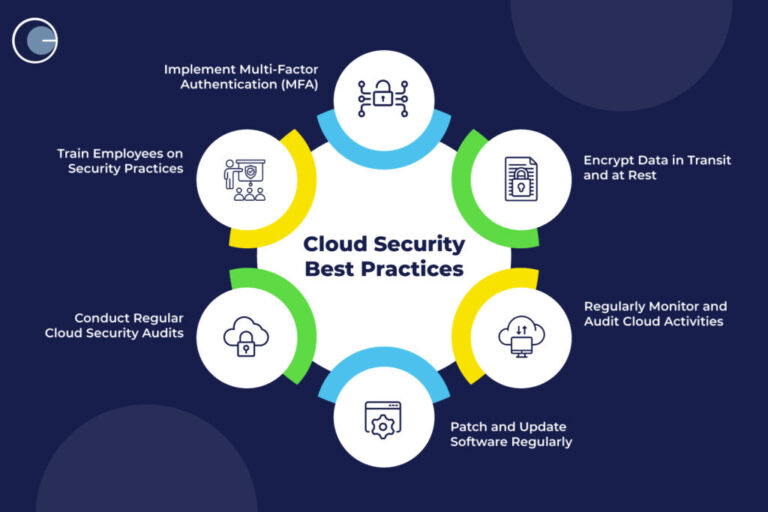
Discover effective methods and best practices to secure your data in the cloud. Learn about encryption, access controls, monitoring, and compliance strategies.
Introduction to Cloud Data Security
Cloud computing has changed how businesses and individuals handle their data. With the cloud, it is easier to store, share, and access information from anywhere. However, this convenience comes with new risks. Sensitive data is now a target for hackers, and accidental leaks are more common. As reliance on the cloud grows, so does the importance of protecting data from threats like unauthorized access, data loss, and cyberattacks. Understanding cloud risks and how to manage them is critical for anyone using these services. This article explores proven strategies to keep your cloud data safe, focusing on practical steps and real-world best practices.
Understanding Cloud Security Fundamentals
Cloud security is based on a shared responsibility model. This means that cloud service providers handle the security of the infrastructure, such as physical servers and network hardware. Customers, on the other hand, are responsible for securing their own data, applications, and user access. Knowing where your responsibilities begin and end is critical to avoid security gaps. Setting up strong account controls, reviewing permissions, and following recommended guidelines helps prevent breaches. For more details, see Best practices to safeguard data in cloud security.
Data Encryption: The First Line of Defense
Encryption is a core method for protecting cloud data. By scrambling information, encryption ensures that only authorized users with the correct key can read it. This applies whether data is being sent over the internet or stored in the cloud. Organizations should use strong encryption algorithms, such as AES-256, and never store encryption keys in the same place as the encrypted data. It is also important to manage keys carefully, rotating them regularly and limiting who has access. Following encryption standards protects sensitive information even if a hacker gains access to your files. The NIST provides guidelines on cryptographic standards.
Access Control and Identity Management
Controlling who can access cloud data is essential for security. Multi-factor authentication (MFA) is a simple way to stop unauthorized users, requiring something users know (like a password) and something they have (like a code sent to their phone). Role-based access control (RBAC) assigns permissions based on job roles, so employees only see data they need. Regular reviews of user access help catch mistakes, such as former employees still having access or users with more permissions than necessary. Strong identity management systems also log access attempts, making it easier to spot suspicious behavior.
Continuous Monitoring and Threat Detection
Monitoring your cloud environment is crucial for detecting threats early. Automated tools can track who accesses data, when changes are made, and where data is moved. Setting up alerts for unusual activities, like large data downloads or logins from unknown locations, helps security teams respond quickly. Regular vulnerability assessments and penetration tests uncover hidden weaknesses before attackers can exploit them. Monitoring is not a one-time setup it requires ongoing attention as threats evolve. The Center for Internet Security offers resources on monitoring best practices.
Data Backup and Recovery Planning
Data loss can happen for many reasons: accidental deletion, hardware failure, ransomware, or natural disasters. Regular backups are a safety net, allowing organizations to restore lost or damaged data. Backups should be stored in a secure, offsite location, separate from the original data. Using automated backup solutions reduces human error and ensures backups happen on schedule. Testing your recovery process is just as important as making backups. Regular tests confirm that data can be restored quickly and completely, reducing downtime and minimizing business impact.
Compliance and Regulatory Considerations
Many companies face strict rules about how they handle and store data. Laws like GDPR, HIPAA, and PCI DSS set standards for privacy, security, and reporting breaches. Failing to comply can lead to heavy fines and loss of customer trust. To stay compliant, organizations should keep detailed records of their cloud setup, review security policies regularly, and work with legal experts to interpret new regulations. Audits and assessments help identify gaps and show regulators that you are taking data protection seriously. The U.S. Department of Health & Human Services has a guide on HIPAA and cloud computing.
Employee Training and Security Awareness
Technology alone cannot protect cloud data people play a big role too. Many security breaches happen because employees fall for phishing scams, use weak passwords, or accidentally share sensitive files. Regular security training helps staff recognize threats and know how to respond. Training should cover password management, recognizing suspicious emails, and the importance of reporting incidents quickly. Encourage a culture where employees feel comfortable asking about security and reporting mistakes. A single mistake can lead to a major breach, so ongoing awareness is vital.
Vendor Management and Third-Party Risks
Cloud services often involve third-party vendors, such as software providers or consultants. Each new partner introduces additional risks, as their security practices may differ from yours. Before sharing data, assess the vendor s security policies, check for certifications, and review their incident response plans. Contracts and service level agreements (SLAs) should clearly define each party’s responsibilities for protecting data. Continuously monitor vendors for changes in their policies or signs of compromise. The U.S. Department of Homeland Security offers advice on managing supply chain security.
Securing APIs and Cloud Applications
Many cloud environments rely on APIs (Application Programming Interfaces) to connect services and automate tasks. Poorly secured APIs can become entry points for attackers. To secure APIs, use authentication tokens, limit permissions, and monitor usage for unusual patterns. Regularly update and patch APIs to close vulnerabilities. Developers should follow secure coding practices and test APIs for weaknesses before release. Cloud applications should also be reviewed for security gaps, such as misconfigured settings or outdated software. Taking these steps reduces the risk of unauthorized access through technical interfaces.
Data Classification and Lifecycle Management
Not all data is equally sensitive. By classifying data based on its importance and sensitivity, organizations can apply the right level of protection. For example, personal customer information may need stronger controls than public marketing materials. Data lifecycle management involves setting rules for how long data is stored, when it should be archived, and when it should be deleted. Automated tools can help enforce these rules, reducing the risk of keeping unnecessary sensitive data in the cloud. Proper classification and lifecycle management also support compliance with regulations that require secure data deletion.
Managing Shadow IT Risks
Shadow IT refers to employees using unauthorized cloud services, such as personal file-sharing apps, for work purposes. These services may lack proper security controls, creating hidden risks for the organization. To manage shadow IT, encourage employees to use approved cloud tools and explain the risks of unapproved apps. IT teams can use monitoring tools to detect unsanctioned cloud usage and work with staff to meet their needs securely. Providing secure, easy-to-use alternatives reduces the temptation to turn to unsafe solutions.
Incident Response and Cloud Forensics
A strong incident response plan prepares organizations to react quickly to cloud security incidents. The plan should outline steps for identifying, containing, and recovering from breaches. It should also specify who is responsible for each task and how to communicate with stakeholders and authorities. Cloud forensics involves collecting and analyzing digital evidence after a security event. This can help determine how the breach occurred and what data was affected. Regularly reviewing and updating your incident response plan ensures the team is ready to handle new types of threats.
Securing Remote and Mobile Access
Cloud services allow employees to work from anywhere, but remote access increases security risks. Secure remote access by requiring VPNs, enforcing strong authentication, and using device management tools. Mobile devices should have security features like screen locks, encryption, and remote wipe capability in case of loss or theft. Organizations should set clear policies about which devices can access cloud data and monitor for unauthorized connections. Providing secure access options helps employees work flexibly without sacrificing data security.
Conclusion
Protecting data in the cloud is a continuous process that involves technology, policies, and people. By using encryption, managing access, monitoring for threats, and regularly backing up data, organizations can reduce the risk of breaches and data loss. Training staff and working closely with vendors adds extra layers of protection. Understanding compliance requirements and preparing for incidents ensures your cloud data stays secure. As cloud technology evolves, staying informed and proactive is the best way to defend against new threats.
FAQ
Why is encryption important for cloud data security?
Encryption protects data from unauthorized access by making it unreadable without the correct decryption key, even if it is intercepted or stolen.
What is the shared responsibility model in cloud security?
The shared responsibility model means that the cloud provider secures the infrastructure, while the customer is responsible for securing their data, applications, and user access.
How often should cloud security policies be reviewed?
Cloud security policies should be reviewed at least annually or whenever there are significant changes to your cloud environment or regulatory requirements.
What is multi-factor authentication (MFA)?
Multi-factor authentication requires users to provide two or more verification factors to gain access, adding an extra layer of security beyond just passwords.
How can organizations prepare for cloud data recovery?
Organizations should create regular backups, store them securely, and test recovery procedures to ensure critical data can be restored quickly in the event of loss or attack.